

How to Set Up Claude Better Than Anyone Else in 1 Day
Korea is one of the world's fastest AI adopters, and its workers use AI twice as much as Americans. Here is how you can set up Claude in 1 day.


More than half of Korean workers use generative AI on the job, roughly twice the rate in the US. Korea is the world's second-largest ChatGPT market after the US. One study found Korean workers are picking up AI faster than they picked up the internet.
If you are a foreigner trying to build a career here, it is becoming increasingly important to develop AI fluency, especially beyond just using AI for chatting.
Here’s how to actually properly set up Claude so you can start learning today better than anyone else.
1. Pick your model
There is a model dropdown at the bottom of every chat.

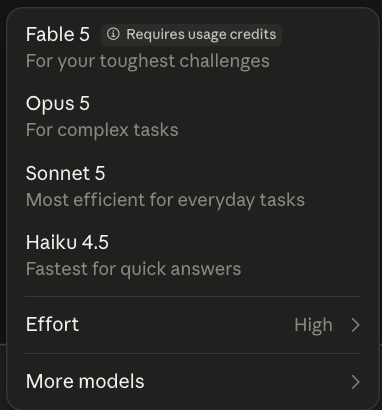
For every day simple tasks, I recommend Sonnet 5.
For complex tasks involving drafting, editing and other multi-step functions, I recommend Opus 5.
For longer vibe-coding tasks and researching, I recommend Fable 5. But, be careful with this model because it eats up your usage very fast!
2. Turn on memory
It helps Claude remember you across every chat.
Click your profile icon, go to Settings, then Memory, and turn on "Generate memory from chat history."

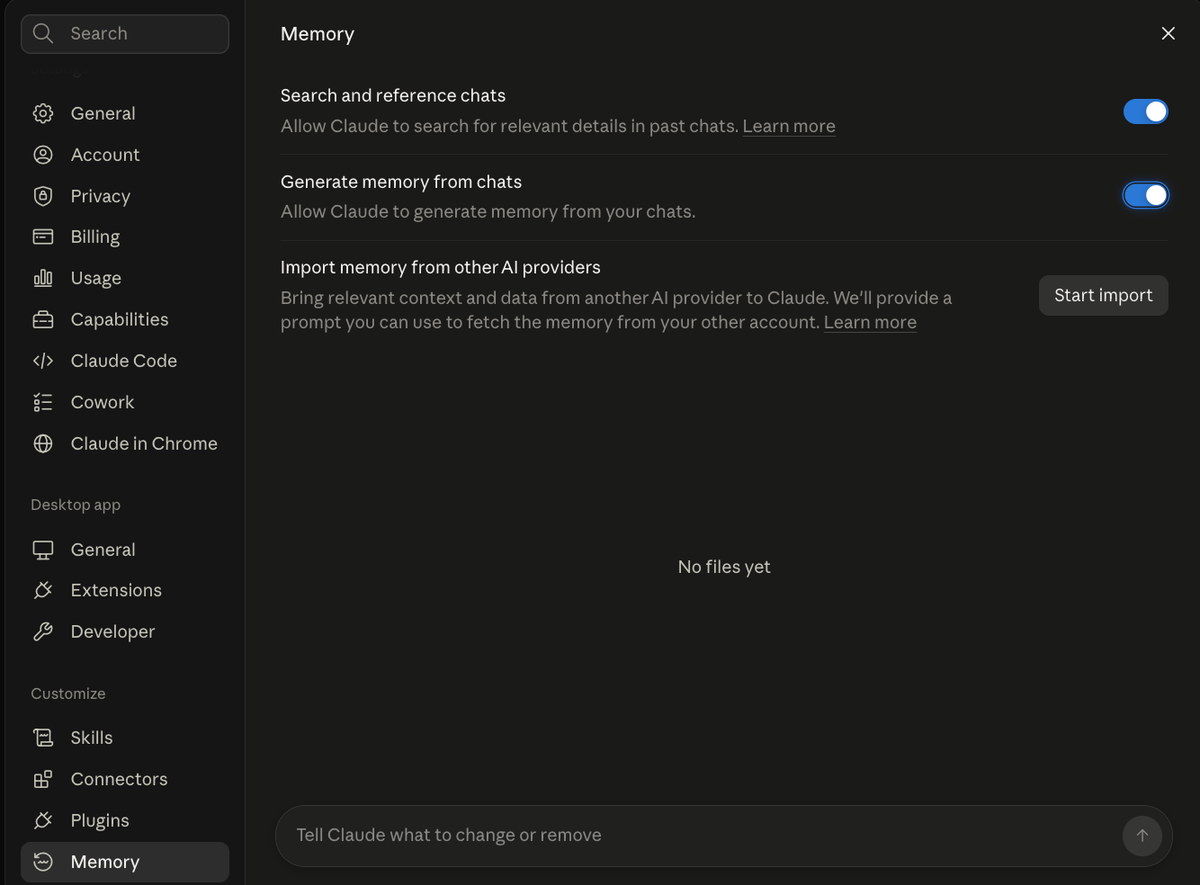
Claude can now remember who you are and all the context between your conversations so you don’t have to explain yourself every-time.
3. Let Claude interview you
You can get Claude to interview you so it has an in-depth context of who you are and what your goals are. I would recommend writing down your career or business goals in this context.
For example, you can get Claude to interview you for a Korean job search goal.
Here’s the prompt 👇
You are building my about-me.md file for my Korean job search. It will be read
every time I work on resumes, cover letters, portfolio, and LinkedIn.
Interview me with 15 to 20 questions (one topic at a time), then compile the
answers into a condensed about-me.md under 2,000 tokens. Cover: who I am (role,
industry, years, target roles in Korea), my visa and honest Korean level, why I
moved to Korea, the resume gap I always explain, my real "why me" story, my hard
skills, a project I am proud of, the tone I want for Korean companies, and the
AI phrases that make me cringe. If I give a vague answer, push back and ask for
a specific example. Then write the file as condensed prose plus a short list of
instructions for Claude at the end.
After you get this file, save it to your computer to use for Claude Projects in the next step.
6. Create projects to use your context
Create a project in Claude Cowork to utilize the file created in previous step.
Click projects in the left side bar, and create a new project. Paste Fill in "What are you working on?" and "What are you trying to achieve?", then click Create project.
For the project instructions, get Claude to always read from your personal context file created in previous step like this:
Before every task, read my about-me.md.
When you help with my job search:
1. Use my voice from about-me.md, not a generic professional voice.
2. If a bullet has no specific outcome or number, ask me. Do not invent.
3. For Korean companies, ask whether the application should be in English, Korean, or both before you start.
4. If the brief is unclear, ask. Do not fill gaps with filler.
You can also find the in-depth Cowork guide here.
7. Connect your apps and add a skill
Connectors plug Claude into your Gmail, Drive, and Notion so it can pull from your real tools. Add them in Settings, Connectors.
Then add a Skill, a saved workflow you run with a slash command instead of retyping a long prompt. (I built a KOVE LinkedIn skill for foreigners targeting global employers in Korea, for example.)
Set it up today
Do this once and Claude stops being a chatbot you just ask questions for. It becomes a partner dashboard that knows your situation, keeps your context, and runs your Korean job search with you. And you built it in one day!
If you liked this article, share this with someone who also needs help learning AI!